Usability research
The MET Museum's 'Perspectives' Usability Evaluation for Mobile
CLIENT
The MET Museum
ROLE
UX Designer
TIME FRAME
3 Months
YEAR
2024



Introduction
We, a group of four graduate students from Pratt Institute, New York, collaborated with the MET museum in order to understand the usability of the perspectives page. Our goal was to improve the findability and usability of the MET’s perspective page.
Methodology
Our methodology began with identifying the problems faced while travelling with a large group of people. After this, we defined our target audience to be young adults and students (age group of 25 - 35). Once the recruitment was done, we conducted 7+ interviews to understand the consuming habits of trip planning apps and 15+ surveys to understand the user's goals of planning trips.
Deliverables
Prototype and Presentation: Click here
Tools
Figma, Zoom, Tobii Eye-tracking device
Scope and Objective

Objectives
Our objective was to understand the current user experience and expectations of the Met ‘Perspectives’ mobile webpage to inform the Met’s future product roadmap for this portion of the site.
Scope
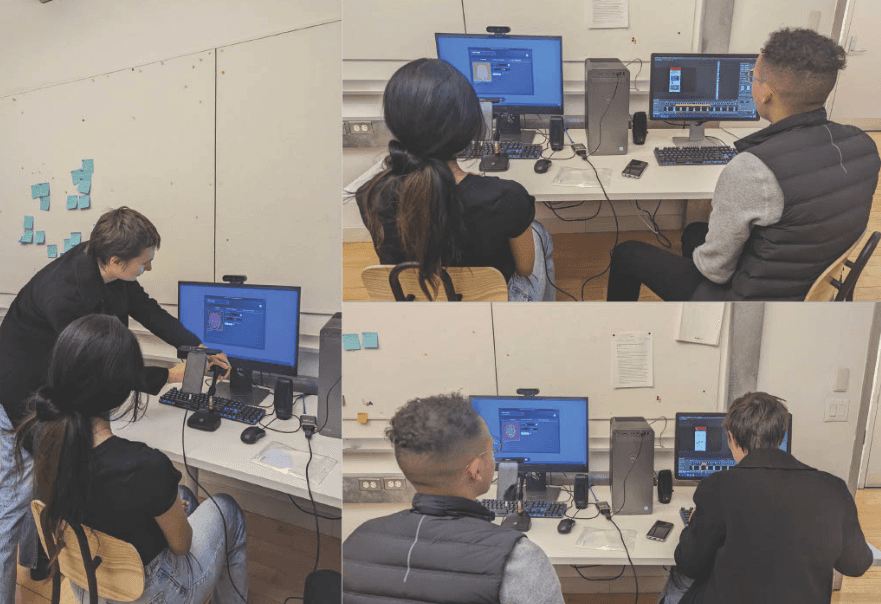
Our scope was to conduct 9 in-person eye-tracking sessions with retroactive think-aloud sessions and investigate findings with behavioral data.
The pages of focus were: ‘Perspectives’ homepage and ‘The Visual Games of Juan Gris.’
Target Audience
Non-experts in art history for eye-tracking and general mobile audiences for Google Analytics.
Screening Tasks

Once we finished pilot testing sessions to test the tasks and tools used in the study such as Tobii Pro eye-tracking Device, we began our process with screening and recruiting participants to conduct an Eye-tracking study. A research ops team was formed to combine recruitment efforts and prepare a screening questionnaire that aimed at understanding users’ educational background, demographics, their interest in pursuing graduate or undergraduate education and to ensure the recruitment of ideal participants for the most accurate results.
Once we finished pilot testing sessions to test the tasks and tools used in the study such as Tobii Pro eye-tracking device, we began our process with screening and recruiting participants to conduct an Eye-tracking study. A research ops team was formed to combine recruitment efforts and prepare a screening questionnaire that aimed at understanding users’ educational background, demographics, their interest in pursuing graduate or undergraduate education and to ensure the recruitment of ideal participants for the most accurate results.
Our Insights
On completing the eye-tracking sessions, using Google Sheets, we placed all the responses of our participants. On Fig-jam and Figma, we segregated and clustered all the responses together based on like and importance.


Analysis and what we found
We received our behavior analytics data from Google Analytics. Behavior analytics is used to track and analyze website traffic and user behavior. However, it does not provide direct feedback from the users. Instead, it is combined with other usability testing methods to provide a more complete picture of the interface’s usability.
We were also able to collect traffic analysis findings which gave us information on the number of visitors on the website and where they came from.


Findings and Recommendations
Finding 1- Navigation on the 'Perspectives' page

Finding 1.1- Current page labels hinder wayfinding
Users found the ‘Articles, videos and podcast’ labels intuitive but expressed confusion when landing on a page titled ‘Perspectives’ due to inconsistency in labeling.
Eye-tracking-
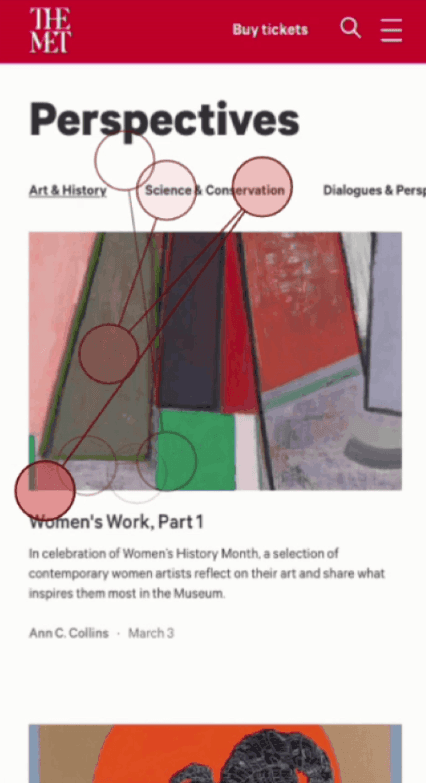
6 out of 9 eye-tracking participants reported directly that the title “Perspectives” is too ambiguous to them
6 out of 9 participants seemed re-entering the ‘Articles, videos and podcast’ menu while being on the Perspectives page indicating confusion.
Behavior analytics-
1.24% of mobile traffic is going from Home to Perspectives indicates that the page is not being found or is not attracting visitors.
b. Users are approx. 10x more likely to go back to the homepage after going to the Perspectives page from the homepage than to any other page.
Finding 1.2- Current secondary navbar is frequently leveraged by users but ineffective in helping them find and refine content quickly.
The user expects additional categorizations like content type and keywords to quickly and easily refine and narrow down their search results.
Behavior analytics-
A high bounce rate indicates that visitors are not finding what they are looking for quickly / easily.
All visitors (Mobile) - Bounce Rate 69.85%
Perspective Visitors (Mobile)- Bounce Rate 75.86%
Finding 1.3- Pages hosting ‘All [media type]’ are hard to find.
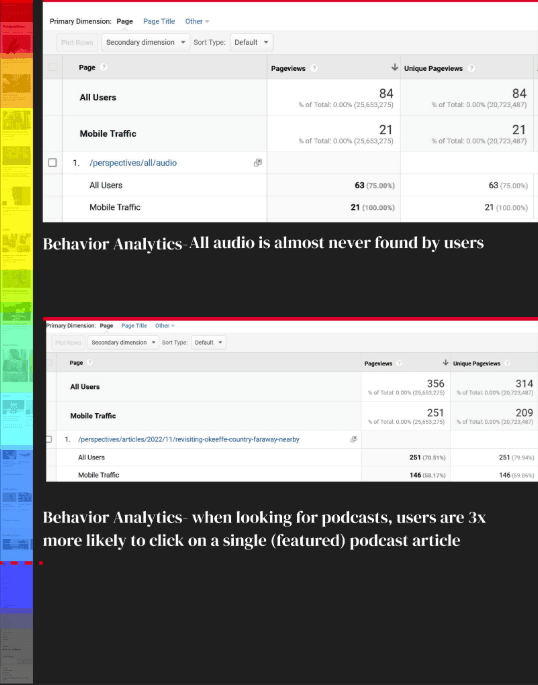
Users do not realize there is a way to view a whole media type selection and are more likely to settle for only clicking on one article one at a time.
Behavior Analytics-
A scroll map shows that, of 16 randomly sampled users, most indeed scroll the length of the Perspectives homepage.
Eye-tracking-
No eye-tracking participant found the “All Podcasts” page when told to “Look for the Met’s podcasts.
Recommendation 1- Navigation on the 'Perspectives' page

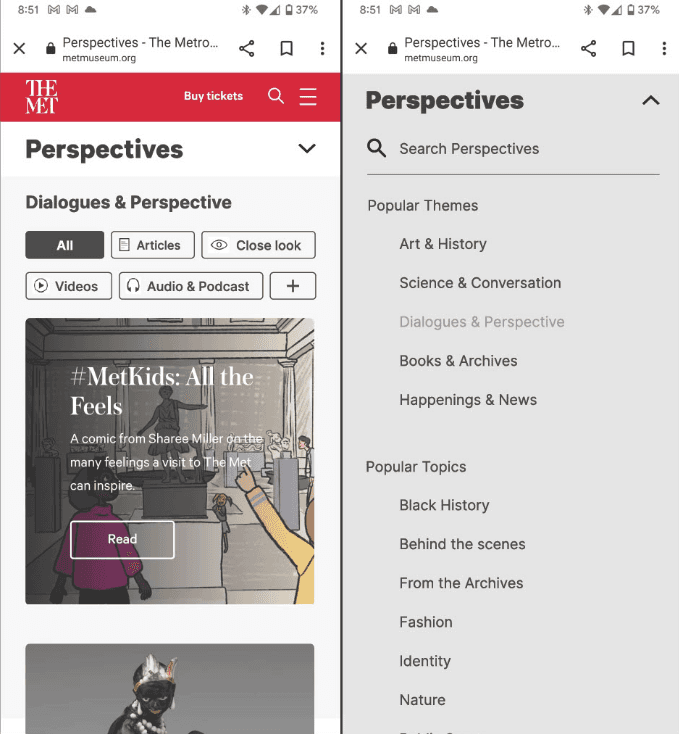
Recommendation 1.1- Switch to a mobile-friendly drop-down menu & add content type filters to the top of the page.
Content type filters -
We could add chips like ‘Articles’ & ‘videos’ below the page title that would introduce page content and allow content refinement. This would help the users understand the content of the page better
Mobile-friendly drop-down menu -
We could condense the horizontal top navigation bar into a dropdown navigation menu with additional content categorization for better interaction and easy search via mobile.
Recommendation 1.2- Improve user location understanding by highlighting page titles.
Page Labels-
We could use respective page labels to give the users a sense of where they are, how they got to a certain page, and where they might want to go. essentially it would help the users navigate around the page.

Recommendation 1.3- Introduce a refined search for Perspectives content.
Search ‘Perspectives’-
Showing results within ‘perspectives’ helps users to find and refine content easily.
Similarly, the visual consistency of filter options can improve search efficiency.
Finding 2- Engagement with different content types

Finding 2.1- Users are not seeing or understanding icons by simply skimming.
Icons on images are often missed at first glance & users are not understanding them quickly enough.
Retrospective Think Aloud- 5 out of 9 participants specifically called out not being able to find or understand what some of the icons meant
Eye-tracking- No one fixated on icons when starting on the ‘Perspectives’ page to look for podcasts. Later glances landed on icons.
Finding 2.1b- Users are not seeing or understanding icons by simply skimming.
Almost all the participants tend to overlook most of the icons. In a lot of cases, they did not seem to notice it at all.
Finding 2.2- Users are searching through text for content clues.
The text seems to be the most viewed content when users skim through the page. The images are looked at less often and the icons do not seem to be looked at at all.

Recommendation 2- Engagement with different content types
Recommendation 2.1 - Add icons and their meanings to header
Introduce Icons at the top of the page-
being able to add icons to the content type Chips at the top of the page would improve the visibility and understandability of the icons and the content type
We could also ensure that the content type is understood by writing it in the heading itself
Recommendation 2.2- Use icons consistently.
Prepare users to look for icons by including them in all content-
As noticed, the inclusion of icons was very inconsistent. So, adding icons to missing content types like ‘Articles’ would help with consistency and make sure the icons were not overlooked.
Finding 3- User interaction with Close Look articles
Finding 3.1- Lack of embedded wayfinding tools can lead to user frustration with Close Look articles.
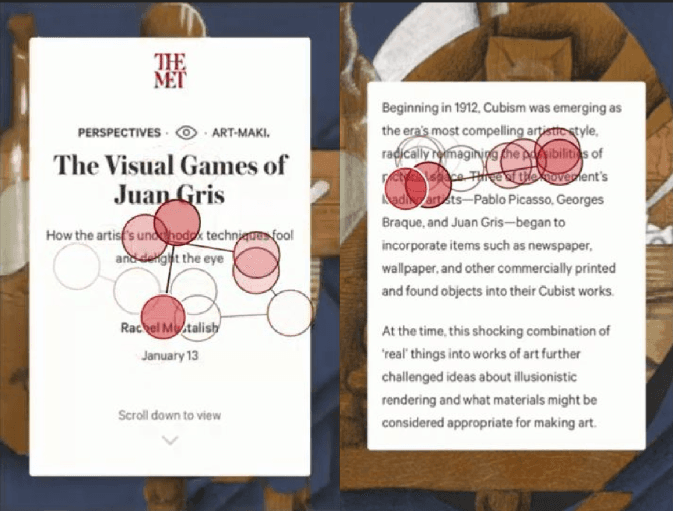
The Retrospective Think Aloud participants reported that they wanted but couldn’t find-
a way to see the whole image (9 out of 9)
their progress in an article and how long it will take to read (5 out of 9)
Finding 3.2- Long text chunks detract the intended user experience.
Eye-tracking-
All 9 eye tracking fixated on the full-screen image between text slides. 5 participants expressed a wish to see the whole image.
The gaze patterns of all 9 eye tracking participants show that their eyes bounce between text and image details equally with short text chunks.

Recommendation 3- User interaction with Close Look articles

Recommendation 3.1- Highlight article length and pinpoint the location of the reader while they scroll.
We added an ‘average time of read’ on the first page in our mockups in order to give the reader an understanding of how long it would take to read the article. Many of the participants were confused as to how long the article was as there was no indication.
We also added a Progress Bar to provide the exact location of the reader
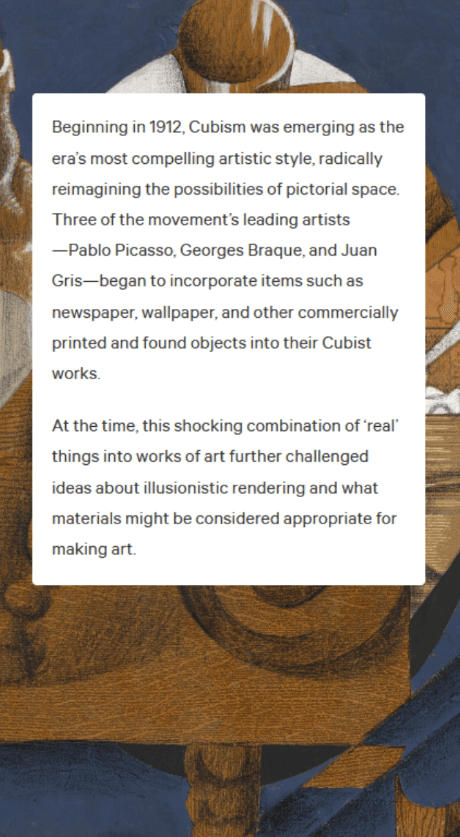
Recommendation 3.2- Limit all chunks of article text to 4 or 5 lines where possible.
We wanted to make sure that the text box took up only a small portion of the screen so the users could also view the image in the background.
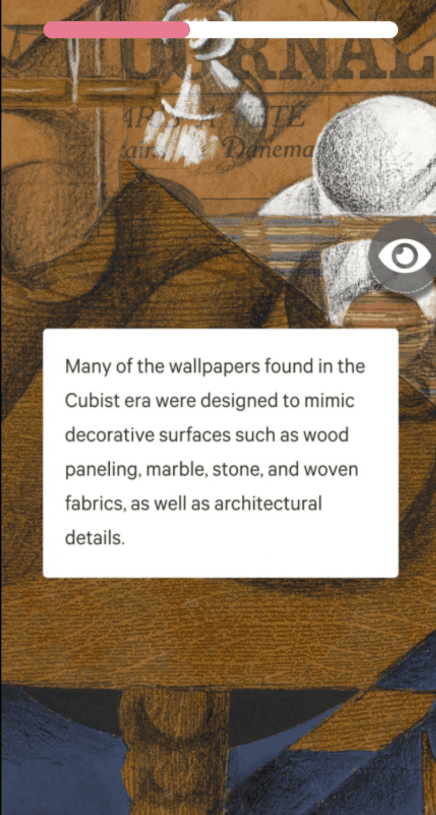
Recommendation 3.3- Affix a “view whole image” icon to the screen.
Users wanted to be able to be able to view the whole background image in one shot. So we added a “view whole page” icon in our mockup which when clicked on, will show the whole page.
Scope and Objective
Client Feedback
In our final meeting, our team delivered a presentation with all our insights, findings, and recommendations to our client, The MET Museum. The client greatly appreciated the thoroughness of the study and how it provided them with data that highlighted some of the issues that have already been a part of the conversations and debate amongst the stakeholders about the future and further changes for the design and development of the project.

Reflection
This was one of the most interesting projects I have worked on to date. Our study highlighted the challenges faced by users while navigating through the ‘Perspectives’ page of the MET website, it also helped us understand the reasons for low traffic on the perspectives page. The client wanted us to understand the current user experience of the page and understand the traffic flow there, we were able to do so via our user testing sessions with the Tobii-eye tracker, Google Analytics, and Hotjar. Overall, this was a very good experience and opportunity for me.